


What is a NIP-07 signer?
How browser-based Nostr signers protect your private key
 Gary Woodfine Jul 1, 2024
NIP-07 is a Nostr standard that lets a website talk to a trusted signer, usually a browser extension, without ever reading your private key directly. That is the whole point. Instead of pasting your nsec into every web app you try, the signer keeps the key in its own extension storage and exposes a controlled API to the page.
That matters because pasting private keys into random websites is stupidly risky. A compromised site, malicious script, fake login flow, or browser clipboard leak can burn your identity fast. A NIP-07 signer reduces that exposure by moving the dangerous part, key handling, out of the web page.
NIP-07 enables browser extensions to expose a window.nostr API for signing Nostr events, allowing web apps to request signatures without direct access to the user's private key.
What a NIP-07 signer actually does
A NIP-07 signer usually does four jobs:
- stores or manages your Nostr private key inside the extension
- exposes a
window.nostrinterface to compatible web apps - asks for user approval before sensitive actions
- returns signed events or public information back to the app
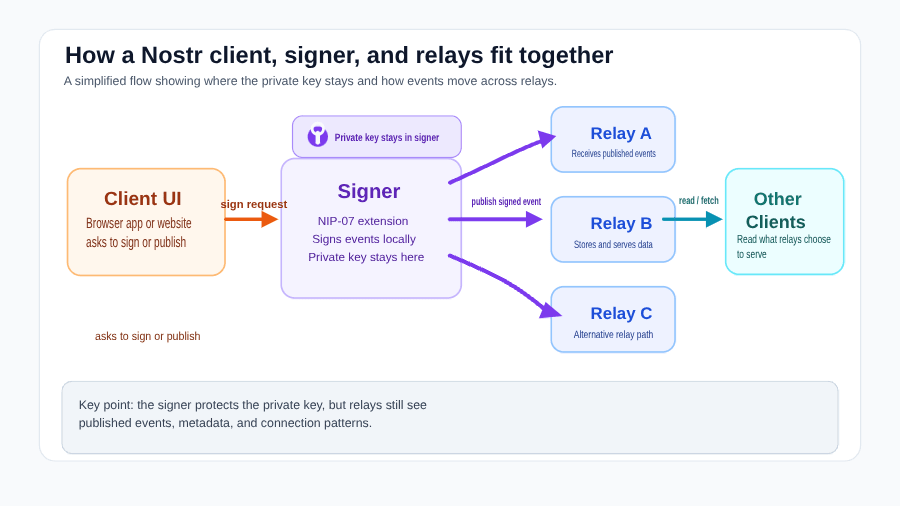
A typical flow looks like this:
- You open a Nostr web client.
- The site asks the signer for your public key or requests a signature.
- The extension prompts you to approve or deny the request.
- If approved, the extension signs the event locally.
- The signed event is returned to the website for publication.
The key point is simple: the website gets the signature, not your private key.
Why this is safer than pasting an nsec into a site
Without a signer, a web app can trick users into handing over their raw private key. Once a site has your nsec, it can impersonate you completely.
With a NIP-07 signer:
- the key stays in the extension, not the page
- approvals can be shown per site or per action
- permissions can often be revoked later
- you can use the same identity across multiple clients without re-importing the key everywhere
This does not make the risk disappear. A malicious or compromised extension is still dangerous, and a user can still approve something stupid. But it is still far better than normalising raw-key copy and paste.
What is a browser extension in this context?
A browser extension is a small program installed into Chrome, Firefox, Brave, Edge, or another supported browser. For Nostr, the extension acts as a signer layer between the web page and your key material.
That means the extension can:
- generate or import your keys
- store them behind a vault password or local encryption
- expose the NIP-07 API to websites
- show approval prompts before signing
In plain English, it is a key manager sitting inside the browser.
How websites interact with a NIP-07 signer
NIP-07 signers commonly inject a window.nostr object into the page. Compatible apps then use that API to request things like:
- the user public key
- event signing
- encryption or decryption support where implemented
A commonly cited example is a web app calling something like window.nostr.signEvent(event). The signer then decides whether to prompt, deny, or sign.
What NIP-07 does not solve
NIP-07 is useful, but it is not magic.
It does not:
- protect you from installing a malicious extension
- replace the need to back up your key securely
- guarantee every website asks only for safe actions
- solve mobile signing, which usually relies on different patterns such as remote signers rather than desktop browser-extension flows
So the right mental model is: NIP-07 reduces web-page key exposure, but good operational security still matters.
When should someone use a NIP-07 signer?
Use one if you:
- access Nostr from desktop web clients
- want to avoid pasting your
nsecinto websites - need one signer across multiple web apps
- care about permission prompts and better key isolation
For most desktop users, it is the practical default.
Diogel and other NIP-07 signers
A NIP-07 signer can be minimal or feature-rich. Some focus only on signing. Others add account switching, vault encryption, approval rules, and relay-related settings.
If you want a practical example, Diogel Browser Extension is built around that signer model: protect keys locally, expose the standard interface, and make approval-based signing less painful.
Conclusion
NIP-07 matters because it turns Nostr signing into an approval-based workflow instead of a raw-secret-sharing workflow. That is a big upgrade.
If you are using Nostr on the web, a good signer is one of the first pieces of basic security hygiene you should put in place. It will not save you from every bad decision, but it does remove one of the dumbest and most dangerous habits in the ecosystem: pasting your private key into random sites.
References

Author
Gary Woodfine
Managing Director
independent software developer, vendor, architect, consultant, blogger, Bitcoin & Nostr Enthusiast. I've provided software development expertise and helped augment software development skills and teams for a number of startups, product companies, corporate IT shops, and consulting firms.
Nostr Relays, Privacy, and Security
Understand the privacy and security trade-offs of Nostr relays, including what relay operators can observe, what they cannot do, and how to use relays more safely.
What is a Nostr Relay?
Learn what a Nostr relay is, how relays work, and why they matter for privacy, censorship resistance, availability, and everyday use on Nostr.