

What is a Nostr client?
Why the app you use is your window on Nostr, not your account

A Nostr client is the app you use to read posts, publish notes, follow people, update your profile and interact with the network.
On a normal social platform, the app, the account and the servers all belong to one company. Nostr splits those roles apart. That changes what an app is, and what it is not.
The simplest way to think about the core concept is:
- your key is your identity
- relays move the messages
- your client is the window you look through
New to Nostr? Start with What is Nostr? for the wider picture, then come back here.
A client is the app layer of Nostr
A client turns Nostr into something you can use. It might be a mobile app, a website, a desktop app or even a command-line tool.
Depending on what it was built for, a client can show you:
- a home feed of people you follow
- profiles, replies and reactions
- notifications and direct messages
- search and discovery
- images, video and other media
- tools for writing and publishing
Under the surface, everything on Nostr is an event: a small piece of signed data such as a note, a profile update, a reaction or a follow list. The client's job is to create those events when you act, and to fetch and arrange other people's events so you can read them.
The app is not your account
This is the part that feels different at first.
Your Nostr identity is a keypair. Your public key is your public identity, the thing people follow. Your private key is the secret that proves you wrote something. Neither of them belongs to the app.
That means a client is replaceable software. If you stop using one client and open another, you should not be starting again from zero. You sign in with the same key, and your profile, follows and past notes are still yours, because they are tied to your key rather than to one company's database.
It also means no client can reset your identity for you. If you lose your private key, the app cannot recover it. How to manage keys for Nostr covers how to back it up properly.
How clients, relays and signers fit together
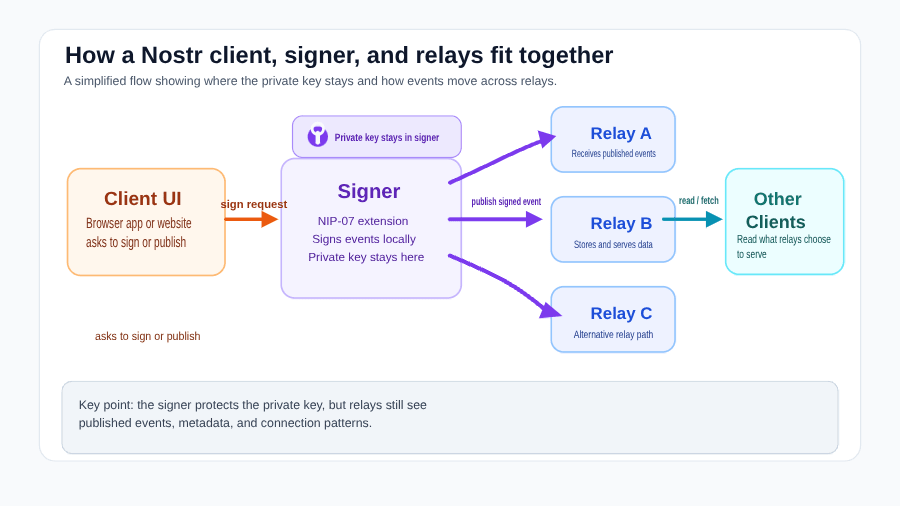
A client does not work alone. It sits between you, the relays that store and forward events, and the signer that protects your key.
Publishing a note
When you write a post, edit your profile, follow someone or react to a note, the client prepares a Nostr event.
Before relays will accept it, the event has to be signed with your private key. The signature proves the event came from you and was not changed along the way.
The client then sends the signed event to your relays. A relay is a server that receives, stores and forwards Nostr events. Relays never need your private key. They check the signed event and decide, under their own rules, whether to accept and store it. What is a Nostr relay? explains how that works.
Reading your feed
Reading works the other way round. Your client asks relays for events that match what it wants to show: recent notes from people you follow, replies to you, profile updates or posts with a certain tag.
The relays send back the matching events, and the client turns them into the feed and screens you see.
Where the signer comes in
Some clients ask for your private key and hold it themselves. That works, but every client that holds your key is another place it can leak from.
A safer pattern is to keep the key in a signer: a separate tool whose only job is to protect your key and sign on your behalf. The client asks the signer for your public key, or asks it to sign an event. The signer shows you the request, and you approve or refuse it.
The client still does its job, but it gets the signature, not your private key. On desktop, that is usually a browser extension that follows the NIP-07 standard. What is a NIP-07 signer? explains it in detail.
Why different clients show different things
Open the same account in two clients and you may see two different feeds. That surprises a lot of people.
Nothing has gone wrong with your identity. Clients make different choices about:
- which relays they connect to by default
- how they filter, rank and order events
- how search and discovery work
- what moderation and muting tools they offer
- which event types and features they support
- how they display media, long-form posts and links
None of this is standardised across clients. So it is normal for one client to show a reply that another misses, or to rank your feed differently.
That does not mean your identity changed. It means the window changed.
Switching clients
Because your identity lives in your key, you can move between clients, or use several at once. Plenty of people use one client on their phone and another on their desktop.
When you switch, a few things are worth knowing:
- Sign in with your signer, not a pasted key. If the new client supports a signer, use it. That way you do not have to copy your private key into another app.
- Check your relays. Your profile and follows travel with you if the new client can find them. Clients can read the relay list you publish to Nostr, but they may also start with their own defaults. If your feed looks thin, check that the client is reading from relays that hold your events.
- Expect some settings to stay behind. App settings such as themes, mutes stored only in the app, or notification preferences may not carry across. Your identity does; the app's own preferences may not.
What to look for when choosing a client
The best client is not just the one that looks nicest. It is the one that helps you use Nostr without hiding the important trust boundaries.
When you try a new client, look for one that:
- makes key handling clear. You should know whether the app holds your key, or whether it asks a signer.
- supports signer-based sign-in. On desktop that usually means NIP-07. On mobile, look for support for a remote or app-based signer.
- explains its permissions. You should be able to see what it is asking to sign, and why.
- lets you see and change relays. You should be able to check which relays it reads from and publishes to.
- does not push you to paste your private key. Be cautious with any app that asks for your raw private key without a clear reason.
- fits how you actually use Nostr. Some clients focus on short notes, others on long-form writing, media, communities or messaging.
Treat a client like any other software you trust with something important. Not every client is safe by default, and a new app from an unknown developer deserves more caution than one you know well.
Conclusion
A Nostr client is the app you use to view and act on the network. It shapes your experience, but it does not own your account.
Remember the three roles and Nostr becomes much easier to reason about:
- your key is your identity
- your client is the window
- relays move the messages
You are not choosing a platform to own your account. You are choosing software to help you use an identity that belongs to you.
If you are ready to set up your first client, follow How to get started with Nostr.
References

Author
Gary Woodfine
Managing Director
independent software developer, vendor, architect, consultant, blogger, Bitcoin & Nostr Enthusiast. I've provided software development expertise and helped augment software development skills and teams for a number of startups, product companies, corporate IT shops, and consulting firms.
What is a NIP-07 signer?
Learn what a NIP-07 signer is, how browser extensions expose the window.nostr API, and why this model is safer than pasting your Nostr private key into websites.
What is a Nostr Relay?
Learn what a Nostr relay is, how relays work, and why they matter for privacy, censorship resistance, availability, and everyday use on Nostr.